 Shipvo
You will start a simulated phone, then change a product's name and price in a text file. When you save the file, the phone shows the change by itself. You will also make a small typo on purpose, read the plain message Shipvo gives you, and fix it. You need no real phone and no coding skills.
Level: beginner. Time: about 10 minutes. On our test machine each save showed up in the phone in about a second (see "What we measured").
New words are explained once, and collected in the glossary.
What you need
- Node, version 22 or newer, and a terminal (how to check).
- A shop app made with
shipvo init. If you have none, type these three lines. The name afterinitis your app's folder.
npx -y @shipvo/cli init tidepool --template shop --name "Tidepool Shop"
cd tidepool
npm install- A web browser and a text editor (Notepad, TextEdit or VS Code all work).
1. Start the phone
Make sure your terminal is inside your app's folder (the one with shipvo.json in it). Type this and press Enter:
npx shipvo run androidShipvo makes a build: a web copy of your app. The first one is the slowest. When it is ready you should see these two lines:
Simulated Android phone at http://127.0.0.1:4600/  (Ctrl+C to stop)
Watching for changes: the phone reloads when you save.
Your browser opens on that address. The second line is the new part: Shipvo now watches your files. Leave this terminal window open for the rest of the tutorial. The number in the address can be different on your computer.
You can use npx shipvo run ios instead. Everything below works the same on an iPhone-style phone.
If something goes wrong.
Port 4600 is in use: another program has that number. Typenpx shipvo run android --port 4700.- It says it cannot build for web and names a file: ask your assistant to fix that file.
- Nothing opens: copy the address from the terminal into your browser.
2. Look at your shop
You should see a phone with "Tidepool Shop" and five products. Look at the fourth one: Wool beanie, $24.00.
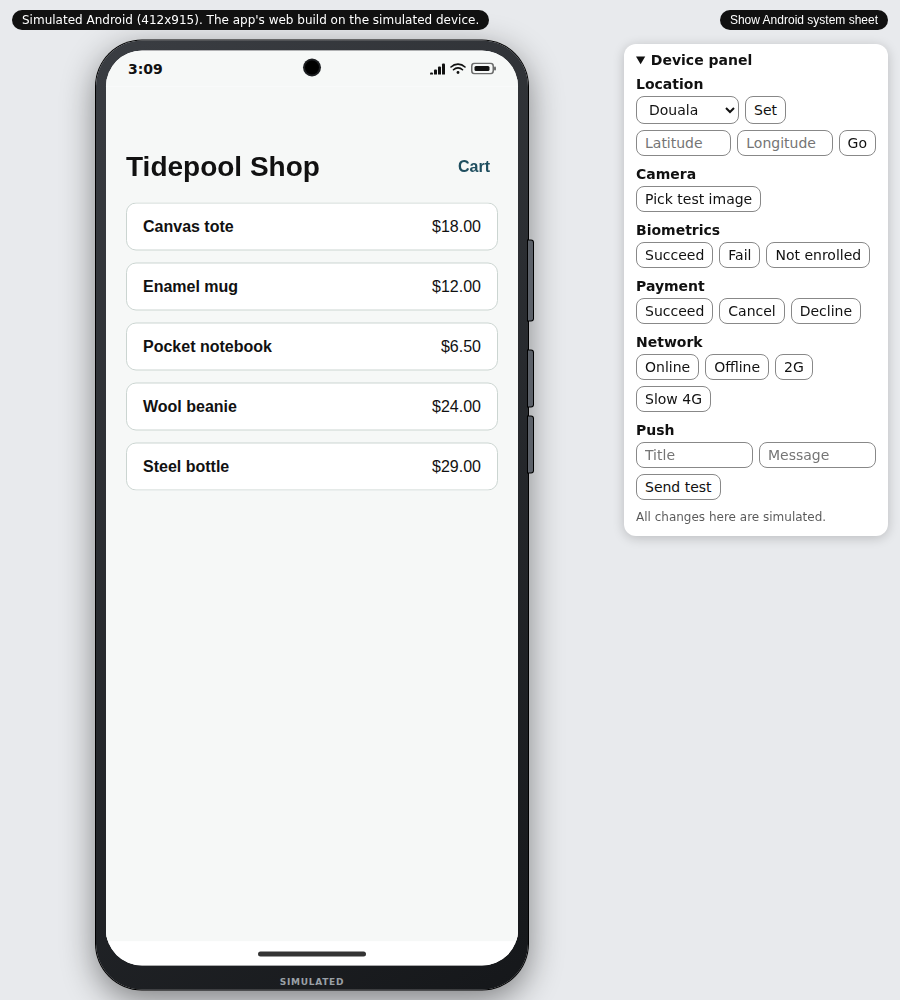
The phone below is the finished Tide & Tackle sample shop, not your Tidepool Shop. Use it to get used to tapping through a shop.
The live phone could not load. Here is a screenshot instead.
3. Change a name and a price
Your products are in one file, src/data/products.json, inside your app folder. Open it in your text editor. Find this block:
{
  "id": "wool-beanie",
  "name": "Wool beanie",
  "price": 2400,
  "description": "A warm hat in undyed wool."
}
Prices are written in cents, so 2400 is $24.00. Change two things:
"name": "Wool beanie"becomes"name": "Merino beanie""price": 2400becomes"price": 2600
Leave the quote marks and the commas where they are. Save the file, then look at the terminal and the phone. Do not reload the browser.
In the terminal you should see:
Rebuilding...
rebuilt in 1.0 s
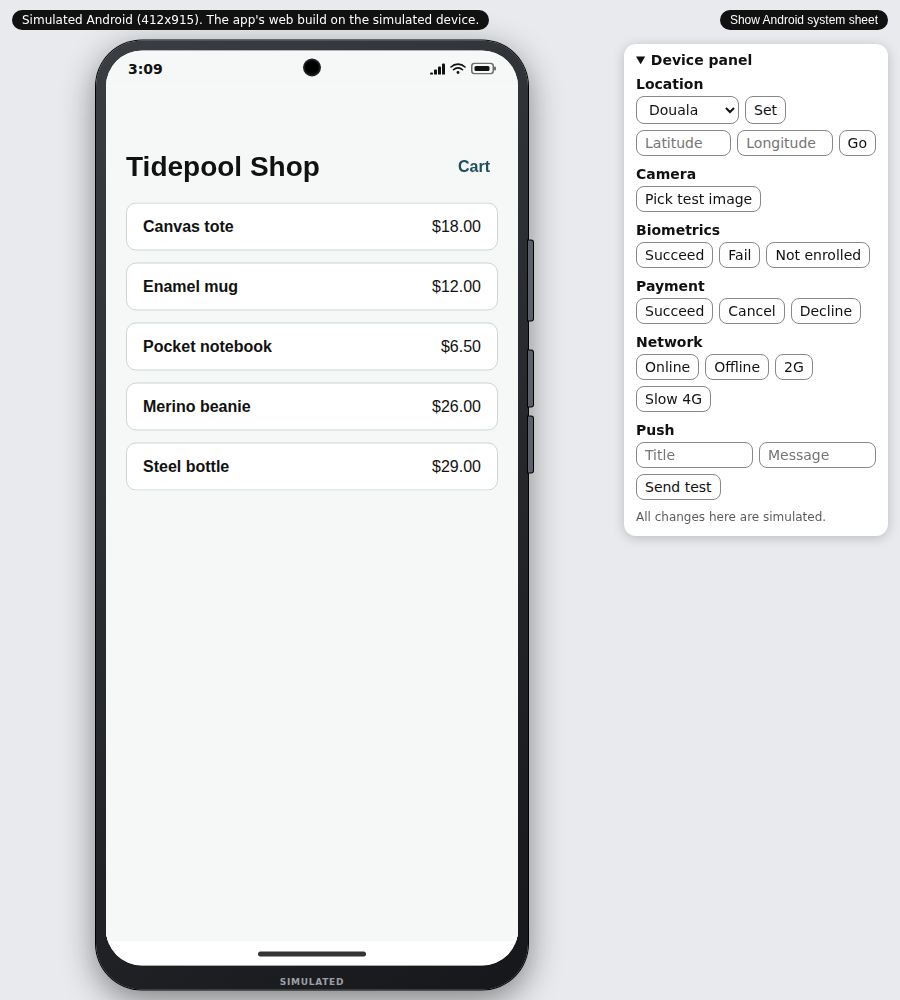
In the phone you should see Merino beanie, $26.00. The phone reloaded by itself. This is called live reload: every time you save, Shipvo rebuilds the copy and shows it.
If something goes wrong.
- Nothing changes: check that you saved the file, and that you edited the one inside the folder where
shipvo runis running.- The phone says "Updating…" for a long time: wait for the
rebuilt inline in the terminal. A big change can take a few seconds.- The phone stays the same and a red bar appears: go to step 4.
4. Make a typo and read the message
Everyone makes typos, so let us make one on purpose. In products.json, find the first product and change this line:
"price": 1800,to this (delete the comma and add a word):
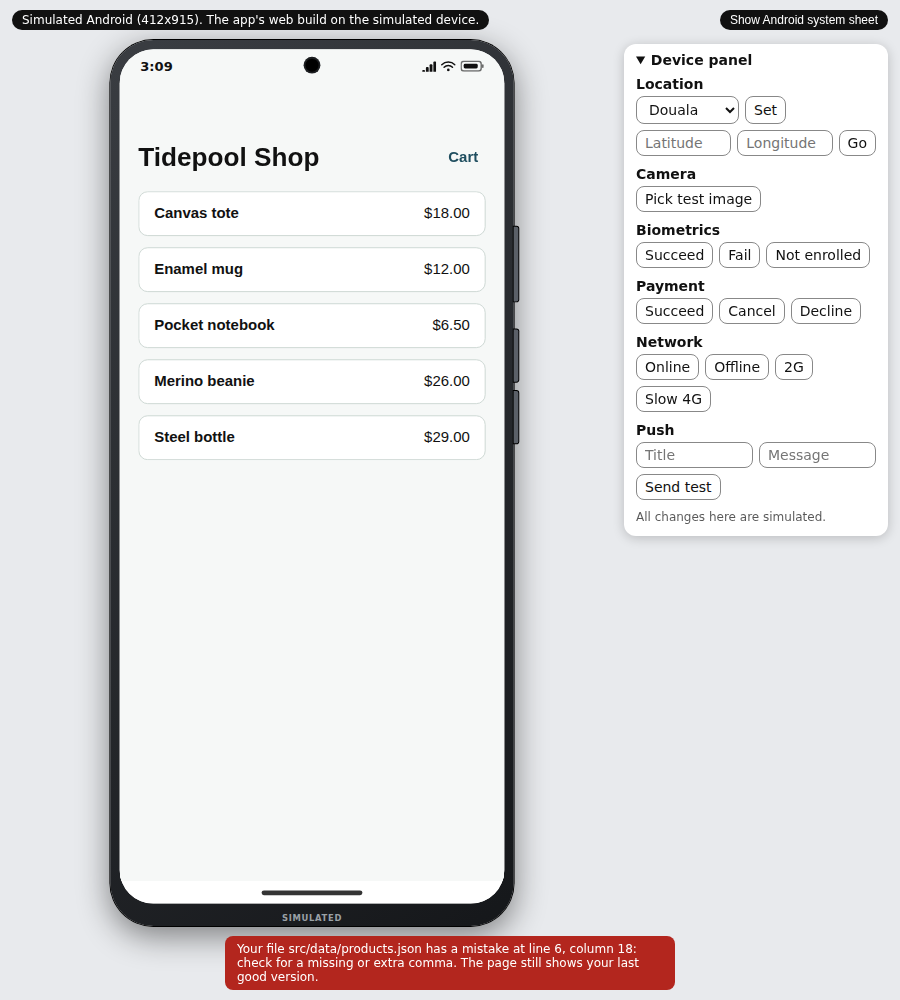
"price": 1800 oopsSave the file. In a few seconds a red bar appears under the phone. If you don't see it, scroll down in the window or make the window taller:
Your file src/data/products.json has a mistake at line 6, column 18: check for a missing or extra comma. The page still shows your last good version.
The terminal prints the same words. The place is counted from the start of the file's built text, so it can sit one line after your edit: you changed line 5, and the message says line 6. Two things to notice. The message names the file and the place. And the phone did not break: it keeps showing your last good version, so you never stare at a blank screen.
Now fix it: put the line back to "price": 1800, and save. The red bar goes away and the phone reloads.
If something goes wrong. The red bar stays after you fix the line: read the new message. It names the next place to look. A JSON file (the kind your products are in) needs a comma between items and no extra words.
5. Stop the phone
Go to the terminal and press Ctrl+C. Your changes stay in the file. Nothing was sent to anyone and no account was used.
Recap
You started a phone with one command, changed a product name and price, saw the phone update on its own after each save, made a typo, read a message that named the file and line, and fixed it. You did not stop and restart anything between changes.
What we measured
On 2026-11-10, on a GitHub Actions Linux runner with Node 22.23, we ran shipvo run android for a new shop app and changed the name and price of one product in products.json. The new name was visible in the Android frame 1.3 s after the file was saved. The terminal printed rebuilt in 1.0 s. A typo in the same file showed the red bar with the line and column. The next save with the typo fixed removed it. We took the screenshots from that run. The repository also checks this on the Android and iOS frames in packages/cli/test/run-live-reload.test.ts.
In a separate CI job, we changed one word in src/data/products.json of the shop template while shipvo run android was running, on ubuntu-latest. The job reads the rebuilt in line the terminal prints. It measures that line, not the time until pixels change. The line read rebuilt in 0.9 s with the warm Metro cache and rebuilt in 1.0 s with --clear. See the CI run.
Next steps
- Make a shop with your own products: put in your own list and prices
- Ship a fix to your customers' phones: when the change looks right, send it to real phones
- Have an AI assistant test your shop before every release
- Run your app on a phone in your browser: all options