 Shipvo
Music: "Thrilled hands holding" by Tymphony (Jamendo, CC BY-SA 3.0) https://www.jamendo.com/track/341563
This video, including its soundtrack, is shared under CC BY-SA 3.0.
Prefer to watch first? This 1 minute 39 second video covers the same steps. Captions and transcript.
You will create a small shop app, open it on a simulated phone in your web browser, change the words on its front page, and check what a release would contain. You need no phone, no Android Studio and no Xcode, and you do not need to know how to code. You will copy and paste about ten short commands.
Level: beginner. Time: the commands run in about a minute on our test machine (see "What we measured" at the end). Reading and editing take longer the first time, and installing Node adds more.
Words in this page that may be new are explained once, and collected in the glossary.
What you need
- A computer (Mac, Windows or Linux) and an internet connection.
- Node, version 22 or newer. It is a free program that runs the tools behind Shipvo. Step 1 checks it.
- A web browser.
- A text editor. Notepad, TextEdit or VS Code all work.
1. Open a terminal and check Node
A terminal is a window where you type commands. Open it:
- Mac: press Command + Space, type
Terminal, press Enter. - Windows: open the Start menu, type
PowerShell, press Enter. - Linux: press Ctrl + Alt + T.
Type this and press Enter:
node --versionYou should see a number that starts with v22 or higher, for example v22.11.0.
If something goes wrong. If you see
command not foundor a number below 22, install Node 22 from nodejs.org, close the terminal, open a new one and try again.
2. Create the app
Make a new app called tideshop. The --name is the name people see.
npx -y @shipvo/cli init tideshop --name "Tide Shop"You should see Created Tide Shop in tideshop, followed by a list of next steps. Shipvo also made a signing key, a secret file at tideshop/.shipvo/seed.txt. Phones use it to check that a release really came from you. Do not share it. Copy it to a USB stick or a password manager so you do not lose it.
Now go into the new folder and download the pieces the app is made from. npm comes with Node.
cd tideshop
npm install
npx playwright install chromium
The second command takes the longest. The third installs a small browser the simulator uses. When each one finishes you get your prompt back.
If something goes wrong. Run
npx shipvo doctorinside thetideshopfolder. It prints one line per check. A line that starts withFAILends with the exact fix. When everything is fine you seePASSon every line.
3. Open your app on a simulated phone
A simulator is a copy of a phone that runs on your computer. Start it:
npm run simWait until you see Simulator on http://localhost:4545. Leave this terminal window open: the simulator stops when you close it.
Now open your browser and go to this exact address:
http://localhost:4545/app/Type the /app/ at the end. Without it you see {"error":"not found"} (we are fixing that).
You should see your app, with a dark teal box that says "Hello from Tide Shop." and four buttons.
This is the finished sample shop, not your starter app. Try it to see where you are heading.
The live phone could not load. Here is a screenshot instead.
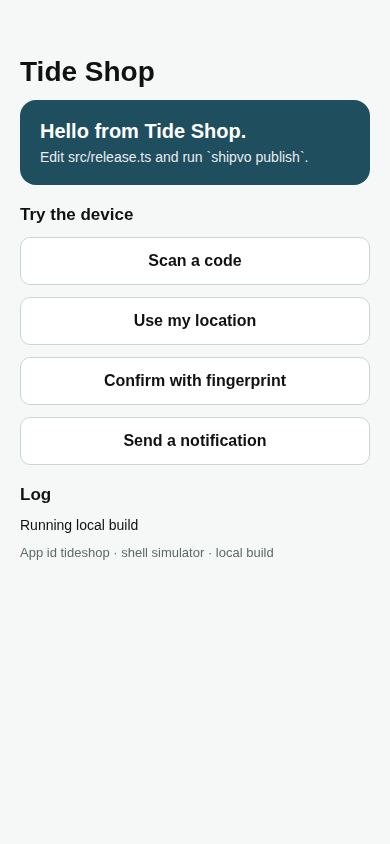
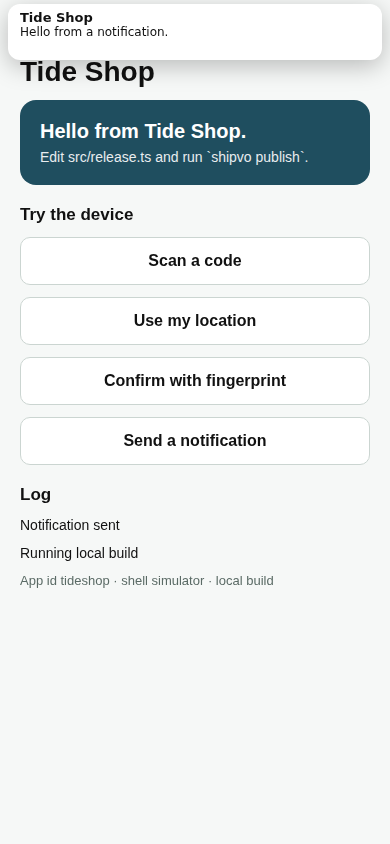
Click Send a notification. The log at the bottom now says "Notification sent". Nothing was really sent: the simulator labels everything it pretends to do.
This phone shows the sample shop too, so it has no Send a notification button. Tap a product to see how a finished app feels.
The live phone could not load. Here is a screenshot instead.
If something goes wrong.
address already in use: the simulator is already running in another window. Close that window, or press Ctrl + C in it, and runnpm run simagain.- A blank page: wait ten seconds and reload. The first build is the slowest.
Executable doesn't existor a message about Chromium: runnpx playwright install chromiumagain.
4. Change the words on the front page
Stop the simulator: click its terminal window and press Ctrl + C. Start it again in a way that watches for your edits:
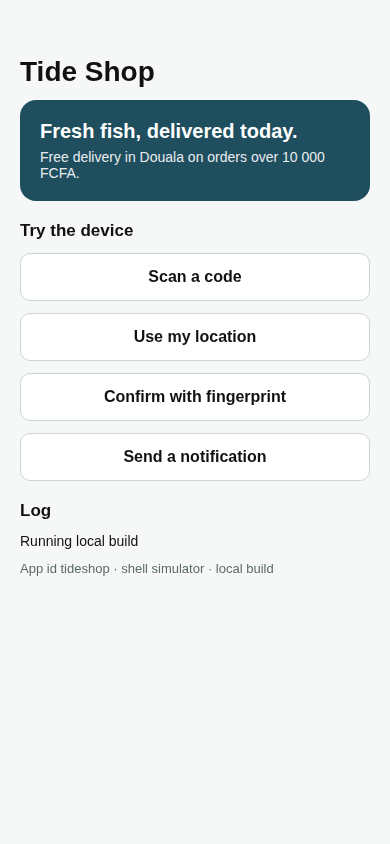
npx shipvo sim --watchOpen the file src/release.ts inside the tideshop folder in your text editor. It has two lines of text you can change: headline and note. Replace the file's last line with this, or write your own words between the quote marks:
export const RELEASE = { headline: "Fresh fish, delivered today.", note: "Free delivery in Douala on orders over 10 000 FCFA." };Save the file. In the terminal, wait for rebuilt in and a number of seconds. Then reload http://localhost:4545/app/ in your browser. The page does not reload by itself.
You should see your new words in the teal box.
If something goes wrong. If the old words are still there, check that you saved the file, that the terminal printed
rebuilt in, and that you reloaded the page. If the terminal printed an error instead, you probably removed a quote mark or a comma. Put the line back exactly as shown above.
5. Check what a release would contain
A release is one numbered version of your app that phones can download. Shipvo sends releases over the air: phones get them through the internet with no app store. A dry run does all the work but sends nothing, so it is safe. Stop the simulator with Ctrl + C and run:
npx shipvo publish --dry-run --skip-web trueYou should see something like this at the end:
Dry run complete. Nothing was sent.
  Release:  1
  Size:     1.67 MB
  Files:    .shipvo/dry-run
Shipvo built your app, signed it with your key and wrote the result to the .shipvo/dry-run folder. To check the signature, run:
npx shipvo verify .shipvo/dry-run/p/tideshop/1/b2If something goes wrong. If it says
Nothing to publish with, you left out--dry-run. If the command fails for another reason, runnpx shipvo doctor.
6. Run the starter test (optional)
Your app came with tests. They open the app in the simulator and check it, so you do not have to. Start the simulator in one terminal (npm run sim), open a second terminal in the same folder and run npm test.
Because you changed the headline in step 4, one test fails with expected the screen to show "Hello from Tide Shop.". That is expected: the test still looks for the old words. Open tests/app.test.ts and change Hello from Tide Shop. to your new headline. Run npm test again and it passes. (We are fixing this too.)
Recap
You:
- opened a terminal and checked Node,
- created an app with
shipvo init, - opened it on a simulated phone,
- changed its words and saw the change,
- ran a release as a dry run and checked its signature.
What we measured
On 2026-11-05, on a GitHub Actions Linux runner with Node 22, packages built from this repository: npm install took 25 s, npx playwright install chromium 8 s, the first npm run sim 7 s until the page answered, and a rebuild after an edit about 7 s. shipvo init and shipvo doctor took under a second each. Your times depend on your connection. We did not time how long a first-time reader takes.
Next steps
- Put the app on a real Android phone and send updates to it: Build your first app, steps 4 and 5.
- Ask Claude or ChatGPT to use your app and tell you where it is confusing: Test with an assistant.
- Keep your signing key safe: Moving to a new machine.