 Shipvo
You will fix a wrong price in your shop and send the fix straight to your customers' phones, without a new app store release. You will send it to a small group first, check that it works, send it to everyone, and then practise the "undo" button.
Level: beginner. Time: about 25 minutes to read and follow, including setup. The commands themselves take under a minute each (see "What we measured").
New words are explained once, and collected in the glossary.
What you need
- A shop made with Shipvo: do Make a shop with your own products first (steps 1 and 2 are enough), and a terminal (how to open one).
- A Shipvo account to send real releases. You get one when you type
npx shipvo login(it opens GitHub) andnpx shipvo app create(it registers your app). Do both once, inside your app's folder. - No account yet? Steps 1 to 3 work without one, because they are practice runs. Steps 4 to 7 need the account.
The word over the air means an update that reaches phones through the internet, so nobody has to go to the app store. A release is one numbered version of your app that phones can download. Shipvo signs each release with a secret key that stays on your computer, so a phone only accepts updates that really come from you.
1. Find the mistake
In the shop template, the Canvas tote costs $18.00, but you meant to sell it for $15.00. If your shop has your own products, pick one of them and a new price instead. Open your shop on a simulated phone. Make sure your terminal is inside your app's folder and type:
npx shipvo run androidWhen you see Simulated Android phone at http://127.0.0.1:4600/ the phone is ready (the number can differ). Your browser opens on it.
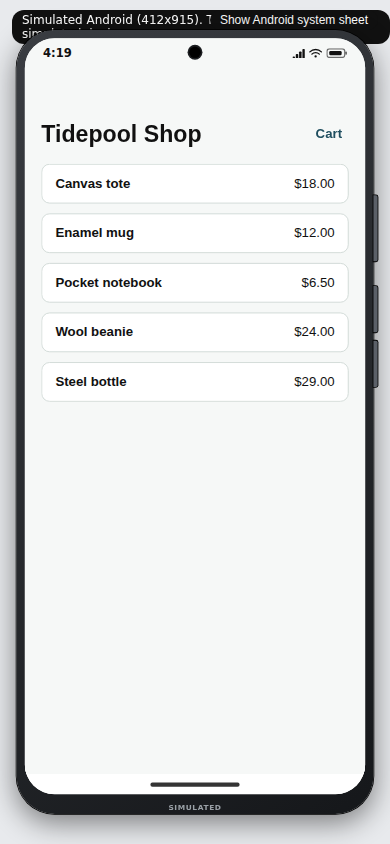
The live phone could not load. Here is a screenshot instead.
The phone above is a live practice shop: tap a product, add it to the cart, and open the cart. You should see the name, the price and the total.
If something goes wrong. If the terminal says
Port 4600 is in use, typenpx shipvo run android --port 4700. More help is in See your app on a phone in your browser.
Press Ctrl + C in the terminal to stop the phone.
2. Fix it
Open src/data/products.json in any text editor. Find the first product and change the price. Prices are in cents, so $15.00 is 1500:
{
  "id": "canvas-tote",
  "name": "Canvas tote",
  "price": 1500,
Save the file. Start the phone again with npx shipvo run android. You should see Canvas tote $15.00.
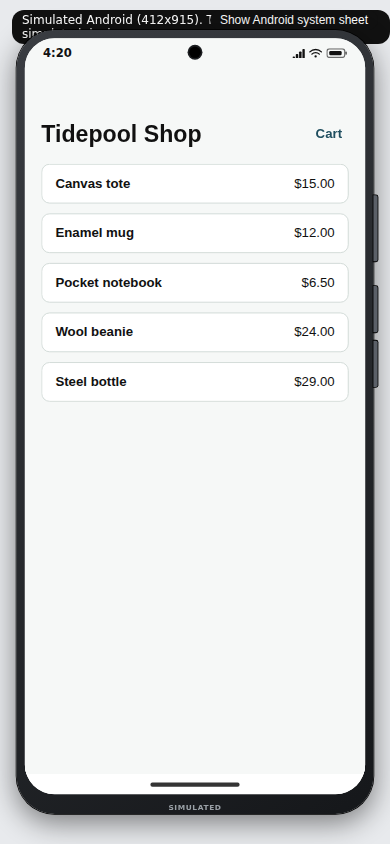
If something goes wrong. If the phone shows an error after you save, you most likely deleted a comma or a quote mark. Put it back. Make a shop with your own products shows how the file should look.
3. Practise first: a dry run
A dry run does all the work of a release but sends nothing to anyone. Stop the phone (Ctrl + C) and type:
npx shipvo publish --dry-run --bands b0 --skip-web trueYou should see this at the end:
Dry run complete. Nothing was sent.
  Release:  1
  Size:     1.68 MB
  Files:    .shipvo/dry-run
--bands b0 means "only the first group". The next step explains it.
If something goes wrong. If it fails, type
npx shipvo doctor. Each line starts with PASS or FAIL, and a FAIL line tells you what to do.
4. Send the fix to a small group first
Shipvo sends a release to customers in three groups, called cohort bands:
| Band | Who |
|---|---|
b0 | A very small group, about 1 in 100 phones |
b1 | About 1 in 10 phones |
b2 | Everyone |
This is called a staged rollout. If the fix has a problem, only a few customers see it. Send the fix to b0 only:
npx shipvo publish --bands b0 --skip-web trueThis is a real release now. Shipvo builds your app, signs it and uploads it. It takes about 13 seconds. The last line it prints is a list of facts about the release. Look for "release": and a number, and "bands":["b0"]. Write the number down. In our run it was 4.
If something goes wrong.
Nothing to publish with: you have not signed in. Typenpx shipvo login, thennpx shipvo app create, and try again.Could not build a small patch from release …; publishing the full bundle: this is a note, not an error. That update is a full copy of the app, so it is bigger, but it still works.- A line that starts
Refused by policy rule: your app has a release rule that stops this publish. The rule is named in the message. See policy.
Phones check for new releases while the app is open. Customers in b0 get the new price. Everyone else keeps the old one.
5. Check that it works
npx shipvo statusOnce phones have received the update you should see a table like this:
auto-halt: off
release  applied  rolled_back  apply ms  cold start ms
4              6            0       370           1005
Read it like this:
- applied: how many phones took the update and are running it.
- rolled_back: how many phones threw the update away because it failed. You want
0. - apply ms and cold start ms: how long, in thousandths of a second, the update took to apply and the app took to open. These are typical values, not a pass mark.
If you see No telemetry yet, no phone has reported. Wait a few minutes and run it again.
If something goes wrong. If
rolled_backis more than 0, orstatussays a release is halted, go straight to step 7.
6. Send it to everyone
When b0 looks fine, practise the move first:
npx shipvo promote --dry-runYou should see:
Would write b1 (android): release 4, copied from b0
Would write b2 (android): release 4, copied from b0
Dry run: nothing was written.
Now do it for real:
npx shipvo promoteYou should see Wrote b1 (android): release 4, copied from b0 and the same for b2. It is the same release, signed again, so every phone gets the exact app you checked. Customers now see $15.00.
If you ran tests with npx shipvo test --report, promote reads the report and refuses to widen a release whose flows failed. You can see how in Have an AI assistant test your shop before every release.
If something goes wrong.
No android pointer found on any bandmeans nothing was sent tob0yet: do step 4 first.
7. Undo it: roll back
Say the new release turned out bad. A rollback sends people back to the last good version. First look at what it would do:
npx shipvo rollback --to 3 --dry-runReplace 3 with the number of the release you want back. You should see:
Rollback preview for tidepool:
  Rolling back to the code of release 3
  New release number: 5
  Platforms: android
  Bands: b0, b1, b2
  Min shell version: 1.0.0
Dry run: nothing was written.
Notice the new release number. A rollback does not rewind time. It publishes the old code again as a new release, so it also shows up in status. To do it:
npx shipvo rollback --to 3Phones fetch it like any other update. A phone also protects itself: if a new release fails to start three times in a row, that phone throws it away and goes back to the one that worked, without you doing anything.
If something goes wrong. If it says
Nothing to publish with, sign in (step 4). If the release number is wrong, runnpx shipvo statusto see the numbers.
Optional: let Shipvo stop a bad release for you
You can ask Shipvo to halt a release by itself when too many phones fail. This example halts when more than 20 percent of at least 20 reports failed:
npx shipvo auto-halt --threshold 0.2 --min-reports 20Type npx shipvo auto-halt to see the setting, and npx shipvo auto-halt --off to turn it off.
Recap
You:
- looked at a wrong price on a simulated phone and fixed it in one file;
- practised with a dry run;
- sent the fix to a small group with
--bands b0; - checked it with
shipvo status; - sent it to everyone with
shipvo promote; - previewed and learned the undo with
shipvo rollback.
What we measured
On 2026-11-06, on a GitHub Actions Linux runner with Node 22, with packages built from this repository and a control plane running on the same machine: shipvo publish --dry-run --skip-web true took 12 s, a real shipvo publish --bands b0 --skip-web true took 13 s, and shipvo promote and shipvo rollback each finished within a few seconds. The status numbers in step 5 come from six practice reports we sent to that local control plane ourselves, not from real customers. Your times depend on your connection. We did not time how long a first-time reader takes, and we ran step 4 onward against a control plane on the same machine, not the hosted one.
Next steps
- Make a shop with your own products: change what you sell.
- Have an AI assistant test your shop before every release: make "check before you promote" automatic.
- CLI guide: release rules (
policy), approvals and the audit log. - Glossary.