 Shipvo
The permission you never test: what happens when a user says no
Google's own guidance says an app should keep working when a permission is denied, and that a second denial can be permanent. How to test the no path before your users find it.
 Hans AdeOctober 31, 20263 min read
Ask a developer to test the camera feature and they will test it with the permission granted. The user who denies it, or who denied it a month ago and forgot, is the one who hits the bug.
What Android tells you to do
Android's guidance on runtime permissions is explicit about the denied case. "If the user denies or revokes a permission that a feature needs, gracefully degrade your app so that the user can continue using your app, possibly by disabling the feature that requires the permission." And: "Don't block the user interface. In other words, don't display a full-screen warning message that prevents users from continuing to use your app at all."
It also advises respect for the choice. The sample code for a denied request says to explain that the feature is unavailable, and "respect the user's decision. Don't link to system settings in an effort to convince the user to change their decision."
The system dialog itself, the page notes, "says what permission your app wants, but doesn't say why," so an explanation before the request is part of the design.
The second denial
One rule surprises people. "If the user taps Deny for a specific permission more than once during your app's lifetime of installation on a device, the user will no longer see the system permissions dialog if your app requests that permission again." That is a permanent denial. The page's advice follows from it: ask only "when they need access to a specific feature; otherwise, you might inadvertently lose the ability to re-request permissions."
So the paths worth testing are: granted, denied once, denied again, and never asked.
Testing it in Shipvo
The simulator lets a test set the permission state and then read what the app does:
test("denying the camera does not strand the shopper", async ({ phone }) => {
  await phone.device.set({ permissions: { camera: "denied" } });

  await phone.tap("Scan a product barcode");

  // The app explains instead of failing silently, and the way forward is visible.
  expect(phone).toSee(/Camera permission is needed/);
  expect(phone).toSee("Can't scan? Type the number under the barcode.");
});
Permission values are granted, denied and undetermined (never asked). Change the strings in the example to whatever your app says. System dialogs are worded per platform: set the phone to iOS and the prompt reads like iOS's, with "Allow" and "Don't Allow".
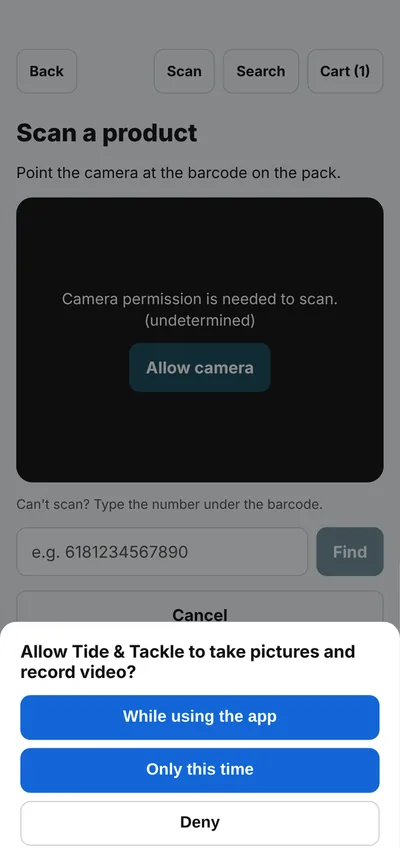
What to check
- The screen says what is missing and why, in words, not only an icon.
- There is a way forward without the permission.
- Nothing is blocked: the user can still browse, go back and use the rest of the app.
- Your app does not re-ask on every launch.
What the simulator cannot tell you
The Android and iOS permission systems differ in detail, and the simulator reproduces the dialogs and results the app sees, not the operating system's own behaviour, such as settings screens or "Ask every time" options. Check those on a device.
Sources
- Android Developers, Request runtime permissions.
- Shipvo, Test your app in CI and Device API.